Terms used across the report and these help pages. Each entry can be linked to directly, so a help page can point at the exact definition it needs.
Snapshot
A snapshot is one recorded state of the document — the text exactly as it stood at a particular moment in its editing history. The report is built from a sequence of these, and most sections use the snapshot as their unit of measurement: the Writing Replay steps through them one at a time, and the table views list one row per snapshot.
Two things follow from this, and they matter for reading every chart in the report:
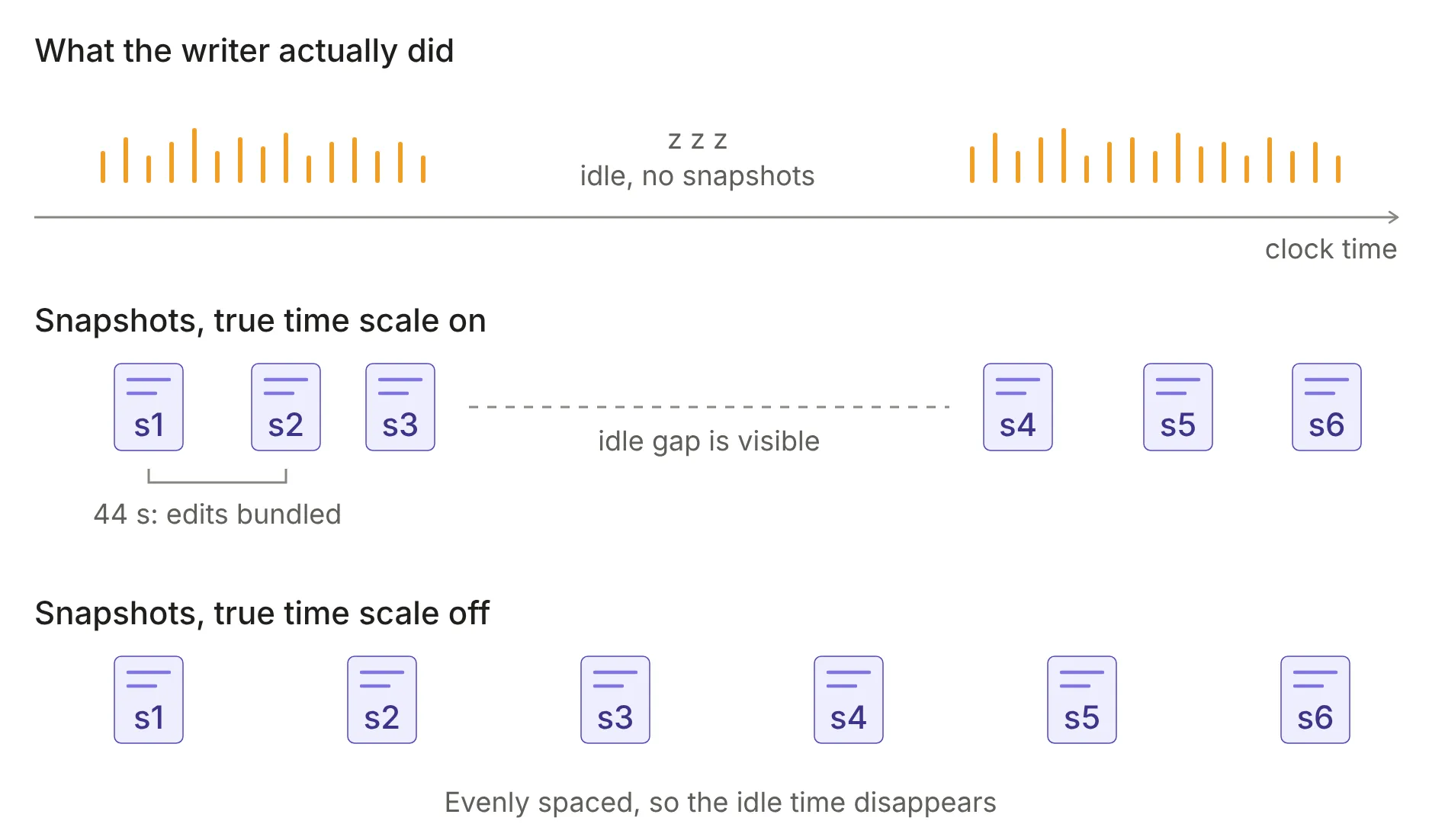
A snapshot is not a keystroke. Each one bundles together everything that changed since the previous snapshot. If two consecutive snapshots are 44 seconds apart, the report can tell you what the document looked like at the start and end of those 44 seconds, but not the order in which the writer made those changes, or how many times they retyped a phrase in between.
Snapshots are not evenly spaced in time. They are recorded as the document changes, so a busy stretch of writing produces many snapshots close together while an idle stretch produces none at all. This is why most charts offer a true time scale option: with it off, snapshots are spaced evenly and idle time is invisible; with it on, the horizontal axis becomes real clock time.
The number of snapshots in a document varies with how much editing happened, not with how long the document is.