Extension for Canvas
A free browser extension for Canvas, where the writing process matters
No accounts or installations required
No LTI integration required
Works in Discussion Boards
Designed for reflection and discussion
What is the Process Feedback extension?
Process Feedback is a browser extension students install to explore or share their writing process in Canvas, where it works in both assignment and discussion board editors. The extension records writing activity locally in the student's browser and turns the data into a writing process report.
It helps shift conversations away from suspicion and toward reflection and process improvement.
With Process Feedback:
-
AI concerns can turn into teachable moments -
Students can reflect on their writing habits -
Teachers can see who is struggling in their class -
Student-teacher conversations become data-driven

We had been desperately waiting for this extension. I am using it in my course this semester.
Anonymous Professor
St. Louis, USA
How the extension works
Students or teachers install the extension themselves. It needs no LTI setup, no changes to your Canvas configuration, and no extra accounts.
For Moodle, Blackboard, D2L, or Schoology, use our LTI integration instead.
The typical workflow is:
-
Step 1. A teacher tells the class about Process Feedback and asks students to install the extension -
Step 2. A student in the class installs the browser extension in their browser, which activates every time the student writes in Canvas -
Step 3. After submitting their work as usual, the student also generates a writing process report (no data is collected by default) -
Step 4. The student submits the report alongside their work or shares their reflection
Who the extension is for
The Process Feedback extension is designed for courses that value process, drafts, and revision.
Ideal for:
-
Teachers who want students to reflect on how they wrote, not just what they submitted -
Writing-intensive, project-based, or AI-supported courses -
Students who want to understand and explain their writing process
What the extension is NOT
Process Feedback does not make claims about student intent or misconduct. It provides student-generated writing process data to support reflection and constructive conversation.
It is not:
-
An automated grading system -
A teacher-centered student behavior monitoring or surveillance tool -
A replacement for institutional academic integrity policies
Features loved by teachers and students
Runs fully locally by default
The extension operates entirely in the student's browser unless the student chooses to save or share their report.
-
No student accounts required -
No third-party analytics -
No server-side data collection by default -
Students control when and what they share

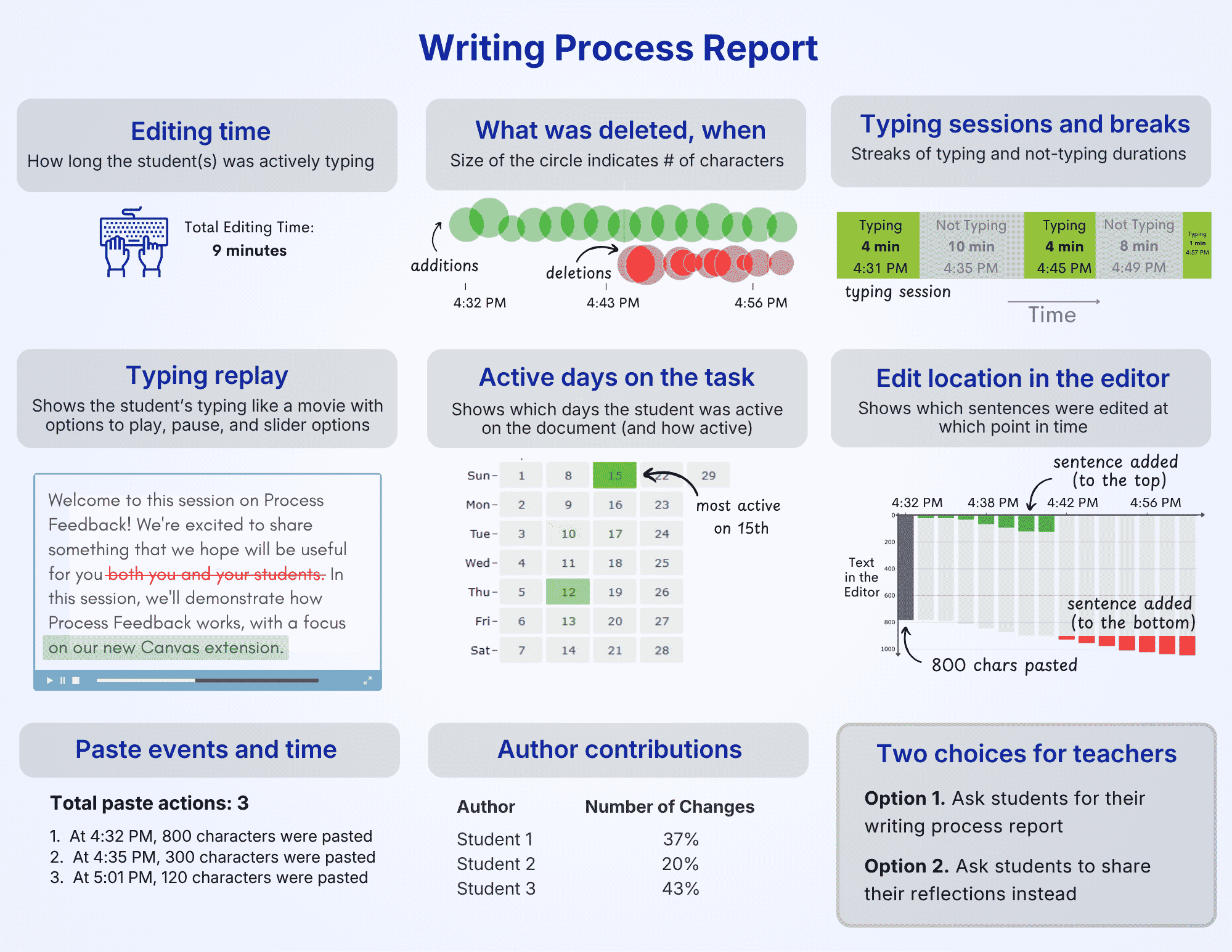
Generates a writing process report
At any point while writing, students can generate a Writing Process Report that summarizes how their work developed over time.
-
Visualizations of writing and revision activity -
Downloadable PDF for sharing or reflection -
Designed for explaining and communicating about the working process
It's not surveillance if students control what they share
In some cases, asking students to share their writing process may raise privacy concerns. For example, a graduate student may notice that much of their writing happened late at night and reflect on whether that affected their focus, revision quality, or stress levels. This kind of insight may be intended for the student's own reflection, not for evaluation or judgment.
Process Feedback is designed with this concern in mind. Students can privately review their own reports and share only what they choose to share.
Teachers do not need to require students to share their writing process or review their detailed activity logs.
Instead, teachers can:
-
Encourage students to privately review their own reports -
Assign reflection prompts -
Collect reflections rather than raw process data
Teacher dashboard (Optional)
For instructors who want a class-level view, Process Feedback offers an optional Teacher Dashboard that runs locally in the browser without collecting any data.
Instead of reviewing individual PDFs, students can voluntarily share their writing process data as ZIP files. Teachers can load these files into the dashboard to explore patterns across an entire class.
The dashboard supports:
-
Comparing writing and revision patterns across students -
Exploring collaboration and drafting behaviors -
Recognizing students who invested effort in revision
Why institutions and IT admins like it
Process Feedback respects users’ data privacy and is easy for IT to approve. Here's why:
-
Runs entirely on the user's device, including the teacher dashboard -
Does not collect any data -
Uses a “local-first” architecture -
Students control who sees and shares their data
Local-first approach: minimizes privacy and security risks
Process Feedback is intentionally designed to reduce institutional risk while supporting instructional goals. It avoids centralized surveillance models and limits technical access to the minimum necessary for functionality.
Risk-minimizing design features include:
-
Teacher dashboards that run entirely in the browser with local processing by default -
Read-only access with no write permissions required -
No automated surveillance, monitoring, or behavioral scoring -
Students control the access and sharing of their own data
Institutional access
The Process Feedback extension for Canvas is free for teachers and students. Institutional subscriptions are available for Process Feedback for Google Docs and the Moodle plugin. See our pricing page.
With institutional access, we offer:
-
Data Privacy Agreements (DPAs or DSAs) with schools, colleges, and universities -
VPAT and HECVAT compliance documents -
Support and uptime guarantees -
Teacher webinars and professional development sessions -
Early access to new features -
Advance notice of updates and upgrades -
Certificate of data privacy and compliance
Frequently Asked Questions

See It In Action
Before you get started, take a look at a sample student writing process report. You can also check out our Teacher Guides to see how easy it is to use Process Feedback in your classroom—just a few simple steps!