LTI v1.3 integration
A privacy-first writing tool for Canvas, D2L, Blackboard, and more
Seamless, secure, and privacy-first
Process Feedback supports LTI v1.3, providing a secure and seamless integration with Canvas, Blackboard, Moodle, D2L Brightspace, Schoology, and other modern LMS platforms. Our LTI implementation is built to minimize institutional risk while maximizing instructional transparency.
LTI integration is one of several ways to deploy Process Feedback. Institutions that do not need it can use our browser extensions and plugins instead, which require no LMS integration at all.
Security and compliance
We understand that institutional procurement requires rigorous review.
Our LTI implementation is built to minimize risk:
-
Read-Only Access: We only request the minimum LMS permissions necessary to launch the tool. -
Data Minimization: We do not collect student data by default, even within an LTI launch. -
Compliance Ready: Support for VPAT, HECVAT, and custom Data Privacy Agreements (DPAs) is available for all LTI integrations.
Architecture and data flow
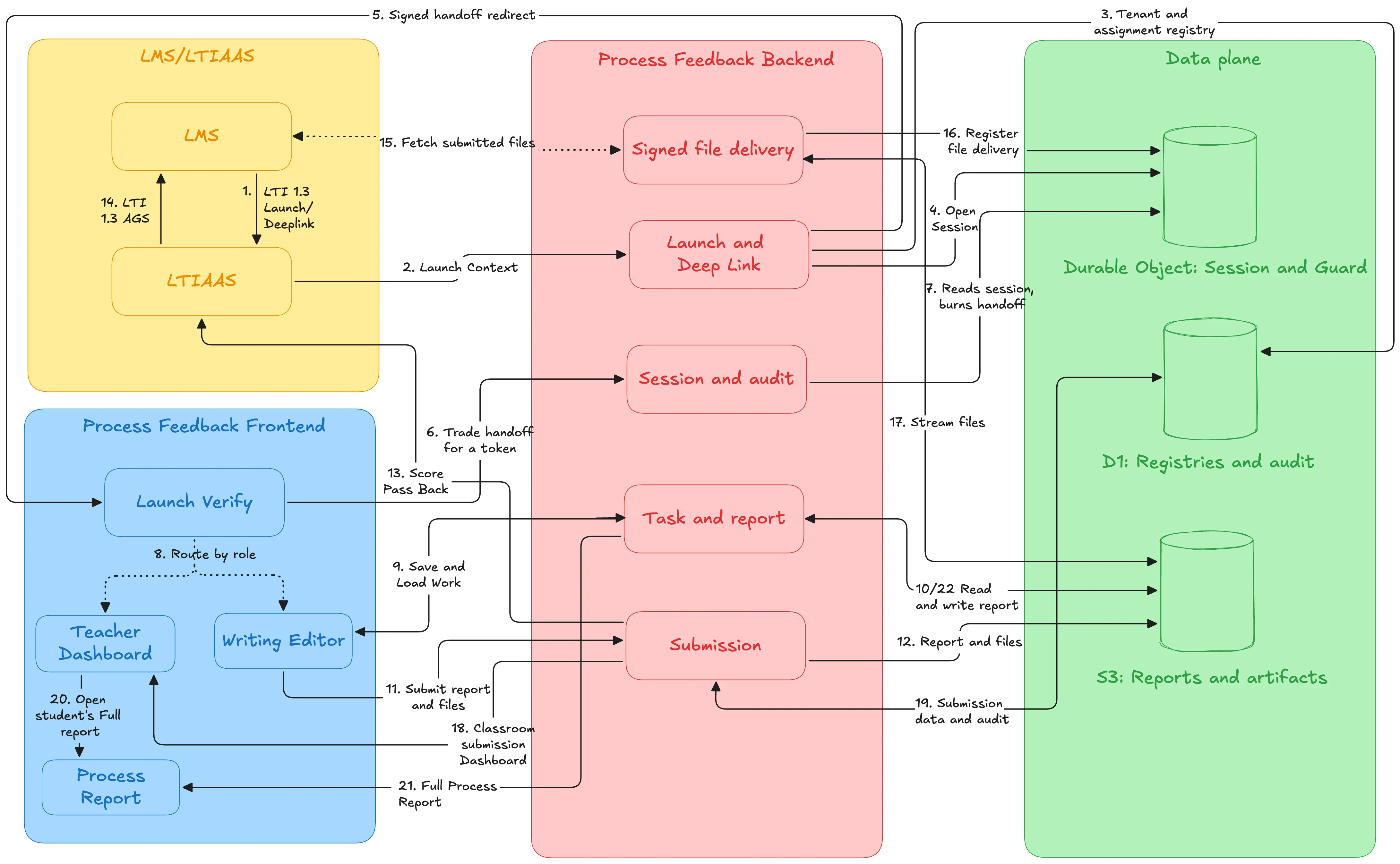
Process Feedback can provide its LTI solution architecture and data-flow documentation upon request. The short version is below: an institutional LMS launches the service through LTI v1.3, a certified LTI service handles the launch, and the application runs on U.S.-hosted infrastructure with data in transit protected by HTTPS/TLS at every step.
How a launch moves through the stack:
-
The institution's LMS launches the service through LTI v1.3. LTIAAS processes the LTI/OIDC launch and identity claims, then passes the validated context to the Process Feedback application. -
The application runs on Cloudflare Workers. -
Operational records are processed in a U.S.-based Cloudflare D1 database. -
Institutional documents, reports, and encrypted backups are stored in AWS S3 in a U.S. region. -
Students use the writing interface through the LMS, and instructors access dashboards and interactive reports through the LMS integration. -
Data flows over HTTPS/TLS.
Institutions reviewing the integration can request the full architecture and data-flow documentation as part of security review.
See what it looks like in practice
A nine-step walkthrough, in screenshots, of the whole flow in Canvas — attaching Process Feedback to an assignment, what students see when they write and submit, and where the writing process shows up for instructors in SpeedGrader and the dashboard. The other supported LMS platforms follow the same LTI v1.3 flow.
What Process Feedback does NOT do
We understand that institutional technology procurement requires rigorous evaluation of risk and compliance. Our LTI v1.3 implementation is built to minimize technical dependencies and prioritize student data privacy.

Process Feedback:
-
Does not replace institutional academic integrity policies: It provides data to support existing policies rather than overriding them. -
Does not automatically assign grades or scores: Our tools provide transparent data; teachers decide how to interpret and assess it. -
Does not monitor students outside instructional contexts: Activity is only recorded within specific assignments or editors. -
Does not require institution-wide surveillance or tracking: We avoid centralized surveillance models. -
Does not require write-access to your LMS: Our LTI integration uses read-only access to provide a secure launch environment.
Generates a writing process report for any Google Doc
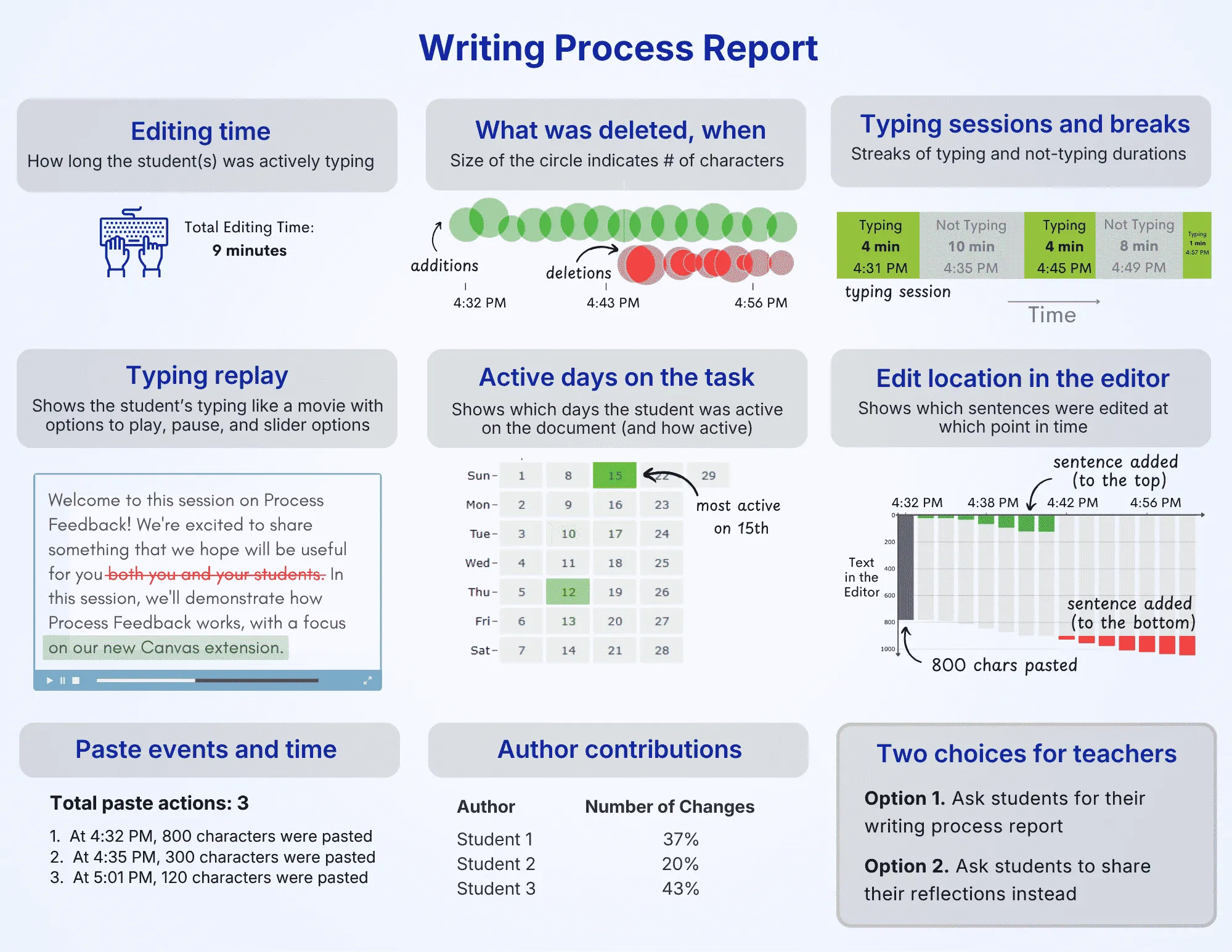
At any point while writing, students can generate a writing process report (or authorship report) that summarizes how their work developed over time.
-
Visualizations of writing and revision activity -
Downloadable PDF for sharing or reflection -
Designed for explaining and communicating about the working process
Very helpful secondary tool for teachers navigating whether or not AI use was present in documents. Essential at a time when AI checkers are suspect at best.
★★★★★ 5.0 rating · Apr 2026
Verified Chrome Web Store Review
Writing process dashboard for teachers
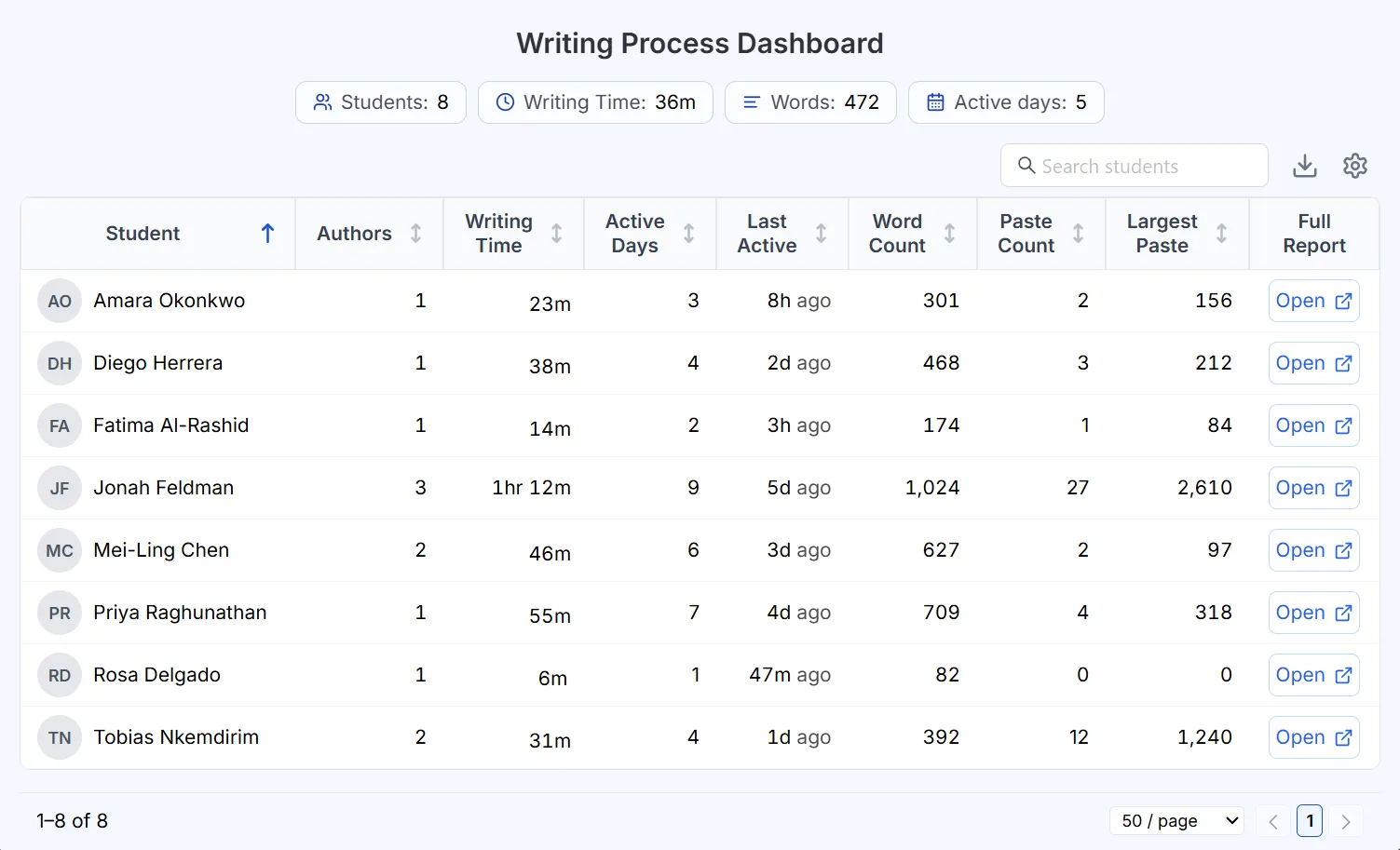
Teachers get a single dashboard to review the writing process across an entire class, without opening each document one by one.
-
See every student's writing process report in one place -
Spot copy-paste, AI use, and unusual patterns at a glance -
Manage and share reports in bulk for large classes
Frequently Asked Questions

Need an institutional quote?
Pricing is finalized after clarifying what level of data handling is required and what level of operational support is expected.