Human verification fails
If you cannot use Process Feedback because human verification fails, here are some things you can try. In Process Feedback, we use a human verification technology called Cloudflare Turnstile, which is a widely adopted technology designed to protect websites and data from bots. That said, sometimes it mistakenly thinks a real person is a bot. If that happens on your device, please read on.
Find why human verification is failing on your device
To find why, here are a few things you can try:
- Test other websites that use Cloudflare (like this one) to see if it’s a broader issue or just with Process Feedback.
- Switch to a different network and try again. For example, connect to a mobile hotspot. If that works, it might mean your usual network is blocking Turnstile. You may need to check with your IT department for help.
- Open the link in a different browser or send it to your phone and try there. If it works on another device or browser, the issue is specific to your current setup.
- Check your system time. If your device’s clock is off, the Turnstile will most likely never pass.
Local browsing option in Google Docs extension
If you are using our Google Docs extension and you cannot get the human verification to work at all, you can explore your writing process locally on your device. Here’s how:
- Step 1. Install the Process Feedback for Google Docs extension if you haven’t already.
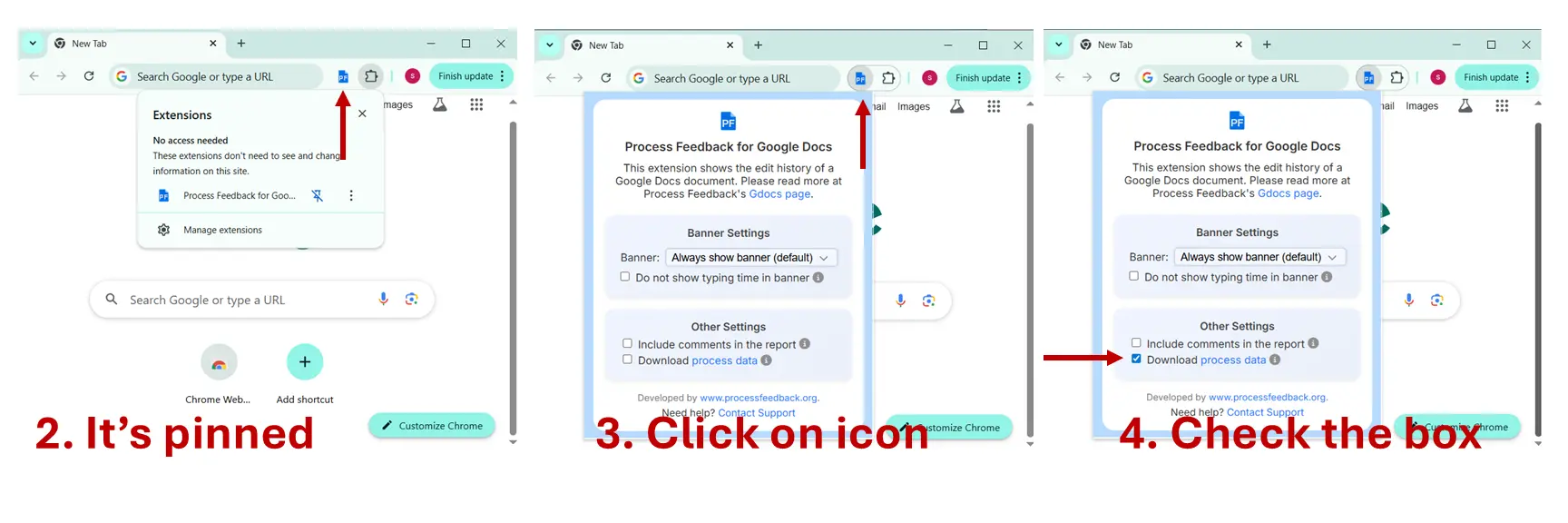
- Step 2. Make sure the extension is pinned and you can see the PF icon.
- Step 3. Click the extension icon.
- Step 4. Check the box that says “Download Process Data.”
- Step 5. Reload your Google Docs page. You should now see a button labeled “Process Data” instead of “Explore Process.”
- Step 6. Click that button to download your Google Docs edit history as a .ZIP file.
- Step 7. Visit https://app.processfeedback.org/gdocs and upload the ZIP file. You’ll then see a report of your writing process based on your data.
Why we have human verification technology
We have designed Process Feedback to be a highly accessible educational tool. Students and teachers can use it without creating an account, logging in, or sharing any personal information. This approach keeps the experience fast, private, and classroom-friendly. However, this level of openness also means our system could be a target for bots, spammers, or malicious actors trying to abuse the service or harvest data. To protect user data and ensure fair access for everyone, we use a human verification system called Cloudflare Turnstile. It’s one of the lightest and most privacy-respecting options available today, and it helps us ensure that the people using our system are real. We know it’s frustrating when human verification fails, especially when you’re just trying to learn or teach. But this protection allows us to keep the platform free and open without compromising on safety. If you run into trouble, we hope the steps above help. If they don’t, please reach out to us at contact@processfeedback.org.